
Create on Linux
A native Ubuntu editor joins Windows. Build your world, write gameplay, and work with Smelty on Linux.
Built for independent game creators
Make the game you keep thinking about. Learn the tools with Smelty beside you, or describe what you want and build it together. Start small, press Play, and make it your own.
Free engine · Free account required · Windows alpha
AVAILABLE NOW / 0.1.13-alpha
A Linux engine build. Linux and Android game exports. This alpha opens up more of your game-making journey.
A native Ubuntu editor joins Windows. Build your world, write gameplay, and work with Smelty on Linux.
Take your project from the Linux editor to a standalone Linux game. More ways to share what you make.
Build Android games from Windows or Linux. Bring your gameplay to a phone or tablet and test it on the device.
Download 0.1.13-alpha for Windows or Ubuntu and read the release notes.
Explore this releaseMeet Smelty
Working solo doesn’t have to mean figuring everything out alone. Smelty is your in-editor AI assistant for learning, creating, and working through the tricky parts. Choose how much help you want.
Ask questions, understand the tools, and build each piece yourself with Smelty explaining the next step.
“Explain how a collectible works, then walk me through making one.”Explore this approach
Describe what you have in mind. Ask Smelty to build scenes and gameplay in your project, then playtest and shape the result together.
“Create a small puzzle room with a switch that opens a door.”Explore this approach
Adjust the controls, investigate a bug, or understand some code. Move between hands-on work and assistance as your confidence grows.
“My character slides after I stop. Help me find out why.”Explore this approach
Tell Smelty what the player does, how they win, and what the game should look like. A single room or a short level is a good first project.
Ask for a step-by-step walkthrough, or have Smelty help create the scene and gameplay. Review the plan, ask questions, and work in your own editable project.
Press Play. Try the controls, see what works, and tell Smelty what you want to adjust. Keep making small changes until it feels right to you.
Free accounts include Smelty Tokens. Paid upgrades and asset generation are coming soon.
Your first project
A jumping character, a puzzle room, or somewhere to explore. Pick one thing you’d enjoy playing and make that work first.
An example request for Smelty
“Help me make a small 2D platformer with left and right movement, jumping, a few platforms, and an exit. Explain your plan before building the first level.”
Once jumping feels good, ask for a collectible or a moving platform.
How to start your first projectInside the engine
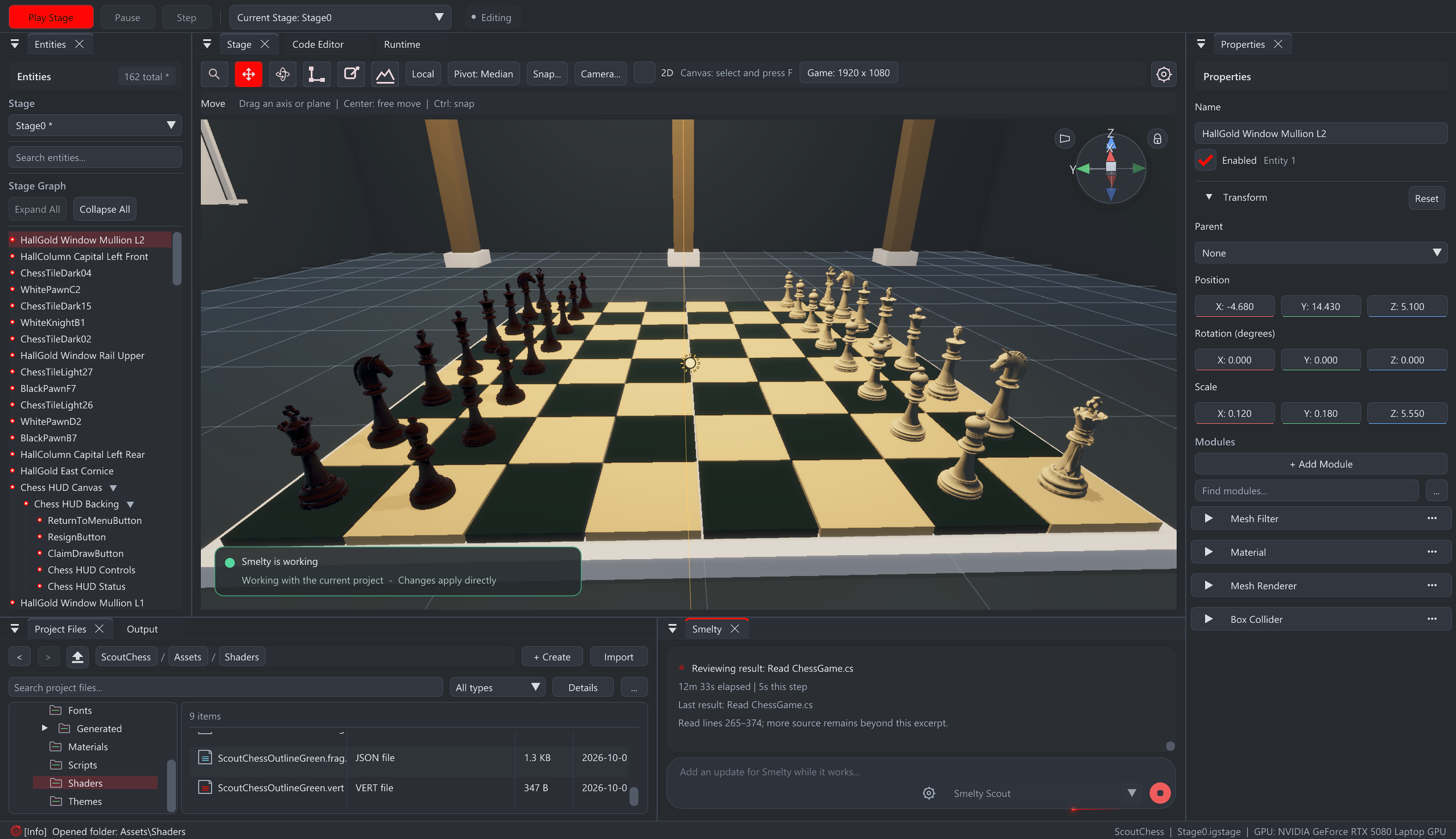
Move objects, change the lighting, adjust the rules, or ask Smelty to do it with you. The editor stays open to you as you learn. Visual tools and C# are there whenever you want to go further.
Where things stand
The current editor runs on Windows 10/11 and Ubuntu. Version 0.1.13-alpha includes the Linux editor, Linux game exports, and expanded Android export workflows. Iron Grid is being built and improved. Some workflows are still rough, and updates can change things. Start with a small project, keep backups, and tell us where you get stuck.
Send feedbackRecent updates
Development builds preserve your exact Smelty model preference when that model is unavailable.
Development builds add a responsive code workbench, clearer diagnostics, and Smelty help for selected code.
All updates and release notes ↗Before you start
No. You can start by describing your idea to Smelty and asking it to build and explain the pieces. You can also use visual tools. C# and optional Python scripting are available if you want to write code yourself.
Yes. The entire engine is free, and Iron Grid takes no commission or royalty from your game releases. You keep ownership of your projects and content. Optional connected services have their own usage limits and costs.
Smelty works inside your project. It can help build scenes, write gameplay, change objects, troubleshoot problems, and check results through playtests. You choose what to make and review the result. The alpha is still improving, so start small and expect to test and refine your game.
Free accounts include an allowance. Your usage screen shows how much remains and when it refills. Unused included usage expires at the reset. Paid upgrades and extra-credit purchases are coming soon; asset-generation credits are separate.
A free Iron Grid account gives you access to downloads and connected services, including Smelty. You can read the website and documentation before signing up.
The current editor runs on Windows 10/11 x64 and Ubuntu 24.04 or 26.04 x64. The download page detects Windows or Linux and lets you choose an installer for another computer. On Ubuntu, choose the package matching your Ubuntu version.
Build standalone Windows games from Windows, Linux games from Ubuntu, and Android games from either editor. Published release notes describe the included export workflows.
The Windows and Ubuntu launchers check for updates. Ubuntu asks for administrator permission before installing its matching package, including newer package revisions. A replacement Windows installer with the same version needs to be downloaded and run manually. Published release notes describe shipped changes; the development journal also includes work in progress.
Start with the free engine and a small version of your idea.